 Scoop
UI 教程:综合项目
前面各篇分别介绍了布局、状态、表单、弹层、数据展示和主题。本篇把它们组合起来,从零写一个小型付款管理应用:一张可以排序、筛选、分页和选择的付款表格;每行有一个操作菜单,删除前弹出确认对话框;删除后在通知里提供“撤销”;页面顶部的统计卡片和柱状图随数据实时变化。
它是 shadcn 组件 Gallery 中 Data 页面的精简版。上一篇:测试 UI;全套目录见总览。
本篇的示例都是单文件程序,用 //! dep: 声明依赖、用 scoop run <文件> --release 运行(Windows 写 sco)。程序分四步逐渐完善,每一步都是可以单独编译运行的完整程序,下一步只在上一步的基础上增加代码。示例在 macOS 上验证。
23. 综合项目:付款数据应用
23.1 先决定数据放在哪里
动手之前,先划分好各部分的职责。这个应用由四部分组成:
| 部分 | 类型 | 负责什么 |
|---|---|---|
| 业务数据 | Payment |
一条付款记录:编号、邮箱、金额、状态 |
| 应用状态 | PaymentStore |
持有记录列表,以及依赖它的表格、图表、通知和对话框状态;提供删除、恢复等操作 |
| 根组件 | PaymentsApp |
只读取 Store,把它画成页面,并把用户操作转发给 Store |
| 行菜单 | PaymentActions |
只保存“这一行的菜单是否展开”这一项局部状态 |
这正是状态与数据流一章的思路:会被多个界面共享、需要比某个组件活得更久的数据,放在应用持有的 Store 中;组件只负责呈现,只保存纯粹属于自己的那一小块界面状态。放在这个项目里,好处很具体:
- 数据只有一份。表格、统计卡片和图表读的是同一份记录。删除或恢复时只需要在 Store 里改一次,不会出现表格已经删掉、图表还在显示旧数字的情况。
- 组件重建不丢数据。表格滚出视野、对话框关闭、组件被重新挂载,记录和选择状态都还保存在 Store 中。
- 操作可以脱离窗口测试。
confirmDelete、restore都是普通方法,可以按测试 UI的做法直接调用并断言,不必启动窗口。
控件库也按这个分工设计:DataTableState、ChartModel、ToastState 都由应用创建并持有,dataTable(...)、chart(...)、toaster(...) 只负责把它们画出来。
23.2 第一步:数据模型与表格
第一步定义付款记录,把它放进 DataTableState,再用 dataTable 显示出来。保存为 ui-project-step1.scoop(下载):
//! dep: scoop:scoop.graphics:0.1.0
//! dep: scoop:scoop.ui:0.1.0
//! dep: scoop:scoop.ui.component:0.1.0
//! dep: scoop:scoop.ui.style:0.1.0
//! dep: scoop:scoop.ui.style.shadcn:0.1.0
import scoop.graphics.Paint
import scoop.ui.*
import scoop.ui.component.*
import scoop.ui.style.Insets
import scoop.ui.style.ThemeSource
import scoop.ui.style.currentThemeSource
import scoop.ui.style.read
import scoop.ui.style.shadcn.shadcnTheme

// One payment record. The id is stable and becomes the table row key.
class Payment(val id: Long, val email: String, val amount: Int, val status: String)

fun samplePayment(index: Long): Payment =
    Payment(
        index,
        ["[email protected]", "[email protected]", "[email protected]", "[email protected]"][index % 4L],
        (125L + index % 9L * 75L).toInt(),
        ["Success", "Processing", "Success", "Pending", "Success"][index % 5L]
    )

// Wrap every record with its stable key; the table never guesses identity.
fun paymentRows(records: Array<Payment>): TableRows<Payment> =
    TableRows(
        Array<TableRecord<Payment>>(records.size) {
            at -> TableRecord(ViewKey.Number(records[at].id), records[at])
        }
    )

fun paymentColumns(): Array<TableColumn<Payment>> =
    [
        TableColumn(
            "status",
            "Status",
            { row -> badge(row.status) { this.variant = ButtonVariant.Secondary } },
            TableColumnSize(GridTrack.Auto, minimum = 112.0, samples = ["Processing"]),
            compare = Some { a, b -> a.status.compareTo(b.status).toInt() }
        ),
        TableColumn(
            "email",
            "Email",
            { row -> label(row.email) },
            TableColumnSize(GridTrack.Fraction(1.0), minimum = 220.0),
            compare = Some { a, b -> a.email.compareTo(b.email).toInt() }
        ),
        TableColumn(
            "amount",
            "Amount",
            { row -> label(f"USD ${row.amount}") },
            TableColumnSize(GridTrack.Fixed(120.0), minimum = 100.0),
            alignment = AxisAlignment.End,
            compare = Some { a, b -> a.amount - b.amount }
        )
    ]

// The application owns the data and the table state; components only read them.
class PaymentStore {
    var records = Array<Payment>(24L) { at -> samplePayment(at) }
    val table = DataTableState(TableData.Local(paymentRows(records)), paymentColumns())
}

class PaymentsApp(private val store: PaymentStore, scope: ComponentScope): Component(scope) {
    private val theme = currentThemeSource()
    public override fun render(): View {
        val store = this.store
        val pageColor = this.theme.read(scope).tokens.palette.background.background
        val content =
            column {
                this.typography("Payments", TypographyRole.H2)
                this.typography("Click a column header to sort.", TypographyRole.Muted)
                this.dataTable(store.table) { this.bodyHeight = 300.0 }
                this.spacing = 16.0
                this.alignment = CrossAlignment.Stretch
            }
        // The root frame paints the theme background and keeps content at the top.
        return frame(content) {
            this.padding = Some(Insets.all(24.0))
            this.alignment = Alignment(AxisAlignment.Start, AxisAlignment.Start)
            this.style { this.background(Some(Paint(pageColor))) }
        }
    }
}

fun main() {
    val store = PaymentStore()
    val source = ThemeSource(shadcnTheme())
    context(source) {
        runUiApplication("Payments", { scope -> PaymentsApp(store, scope) })
    }
}
运行:
scoop run ui-project-step1.scoop --release
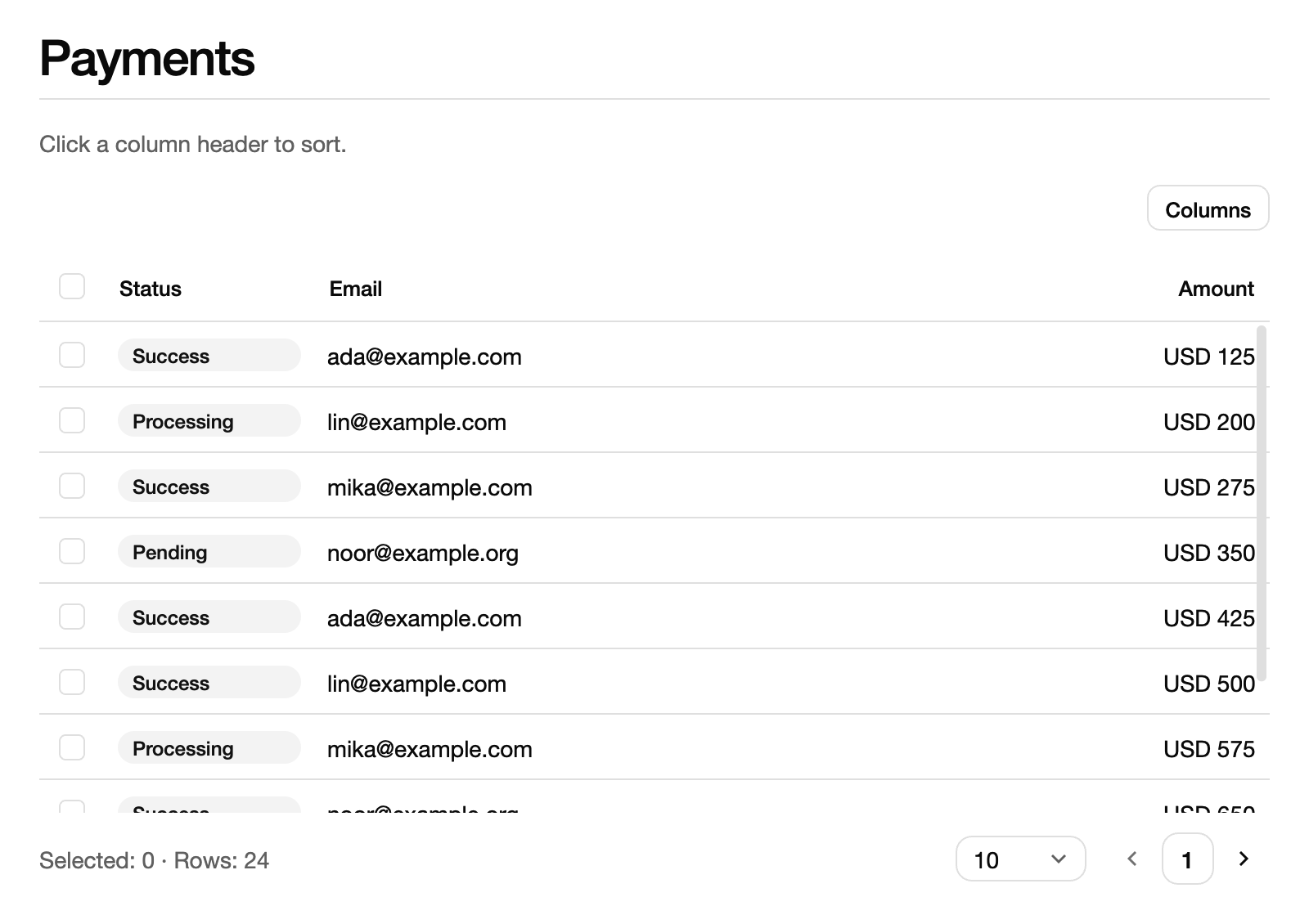
窗口显示标题“Payments”和一张 24 行的付款表格,每页 10 行,表体可以滚动。点击 Status、Email 或 Amount 表头,会按该列升序排序,表头出现 ↑ 标记;再点一次改为降序,第三次取消排序;每行开头的复选框可以选中行;右上角的 Columns 按钮可以隐藏或显示列;表格底部显示“Selected: 0 · Rows: 24”和分页控件。
这段代码有几处值得注意:
- 每一行都有稳定的 key。
paymentRows用TableRecord(ViewKey.Number(records[at].id), records[at])包装每条记录。表格根据 key 识别行:排序、筛选或删除后,选中状态、行菜单等都跟着同一条记录走,而不是跟着显示位置走。所以 key 要用业务编号,不要用数组下标。 - 列是带类型的描述。
TableColumn依次给出列 id、表头文字、单元格怎样显示((Payment) -> View)和列宽。compare提供比较函数后,这一列就可以排序;没有提供的列不能排序。列宽中GridTrack.Fraction(1.0)占满剩余宽度,GridTrack.Fixed(120.0)固定宽度,GridTrack.Auto配合samples按样例文字估算宽度。 - 表格状态属于 Store。
DataTableState保存数据、排序、筛选、分页和选择结果。main创建一个PaymentStore,再交给根组件;组件不自己创建业务数据。 - render 开头先取局部变量。
val store = this.store之后,column { ... }里的 lambda 才能使用store。在 builder lambda 中,接收者是 builder 本身,Scoop 不允许隐式使用外层的组件成员,写this.store或直接写store都会出错,见布局与文字。 - 根 frame 负责铺背景。 组件字段
currentThemeSource()取得main中绑定的主题来源。render 调用this.theme.read(scope)取得应用了窗口显示偏好的页面背景色,再通过frame的style铺满窗口。alignment = Alignment(AxisAlignment.Start, AxisAlignment.Start)让内容从左上角开始排列。
23.3 第二步:筛选、分页和选择
第二步在表格上方加一个邮箱筛选框,改为每页 5 行,限制哪些行可以选中,并在表格下方显示选中付款的合计金额。保存为 ui-project-step2.scoop(下载完整源码)。下面只列出新增和改动的部分。
筛选需要一个大小写不敏感的比较。文件开头新增一项依赖,并在原有 import 之间按字母顺序插入三行 import:
//! dep: scoop:scoop.charset:0.1.0
import scoop.charset.unicodeCasefold
import scoop.text.contains
import scoop.ui.text.TextEditorState
Email 列增加 filter。它接收一行数据和当前筛选文字,返回这一行是否保留:
            compare = Some { a, b -> a.email.compareTo(b.email).toInt() },
            filter =
                Some { row, text -> unicodeCasefold(row.email).contains(unicodeCasefold(text)) }
unicodeCasefold 按 Unicode 规则折叠大小写,比只处理 ASCII 字母的转换更稳妥。
Store 新增筛选框的编辑状态、初始页大小、筛选操作和一个派生值:
    val filter = TextEditorState()
    val table =
        DataTableState(
            TableData.Local(paymentRows(records)),
            paymentColumns(),
            selectable = { row -> row.status != "Processing" }
        )
    init {
        table.setPageSize(5L)
    }

    fun applyFilter() {
        table.setFilter("email", filter.committedText)
    }
    // Derived from the table's selection; nothing is copied into a second list.
    val selectedAmount: Int get() {
        var total = 0
        for (record in records)
            if (table.isSelected(ViewKey.Number(record.id)))
                total += record.amount
        return total
    }
TextEditorState保存输入框的文字、光标和撤销历史。它也放在 Store 里,筛选文字就不会因为组件重建而丢失。setFilter("email", text)用列 id 指定要筛选哪一列。Local 数据的筛选、排序和分页都由DataTableState计算,结果会被缓存,界面只读取当前页。selectable决定哪些行可以选中。这里“Processing”的付款不能选,它们的复选框显示为禁用。selectedAmount每次读取时,根据表格当前的选择状态重新计算,而不是另外维护一份“已选列表”。选择状态只有一份,就不会出现两份数据不一致的问题。
render 中新增筛选框,并配置表格:
        val filterInput =
            input(store.filter) {
                this.placeholder = "Filter emails…"
                this.onEdited = { _ -> store.applyFilter() }
            }
            this.dataTable(store.table) {
                this.bodyHeight = 280.0
                this.pageSizes = [5L, 10L, 20L]
                this.toolbar(filterInput)
            }
            this.typography(f"Selected amount: USD ${store.selectedAmount}", TypographyRole.Muted)
筛选框在 column { ... } 之前创建,再通过 toolbar 放到表格工具栏中。不能在 column 的 lambda 里直接写 input(...) 或 label(...):那里的同名调用会解析成 builder 的成员方法,作用是“把一个子项加入 column”,返回 Unit 而不是 View。pageSizes 是页大小下拉框的选项。
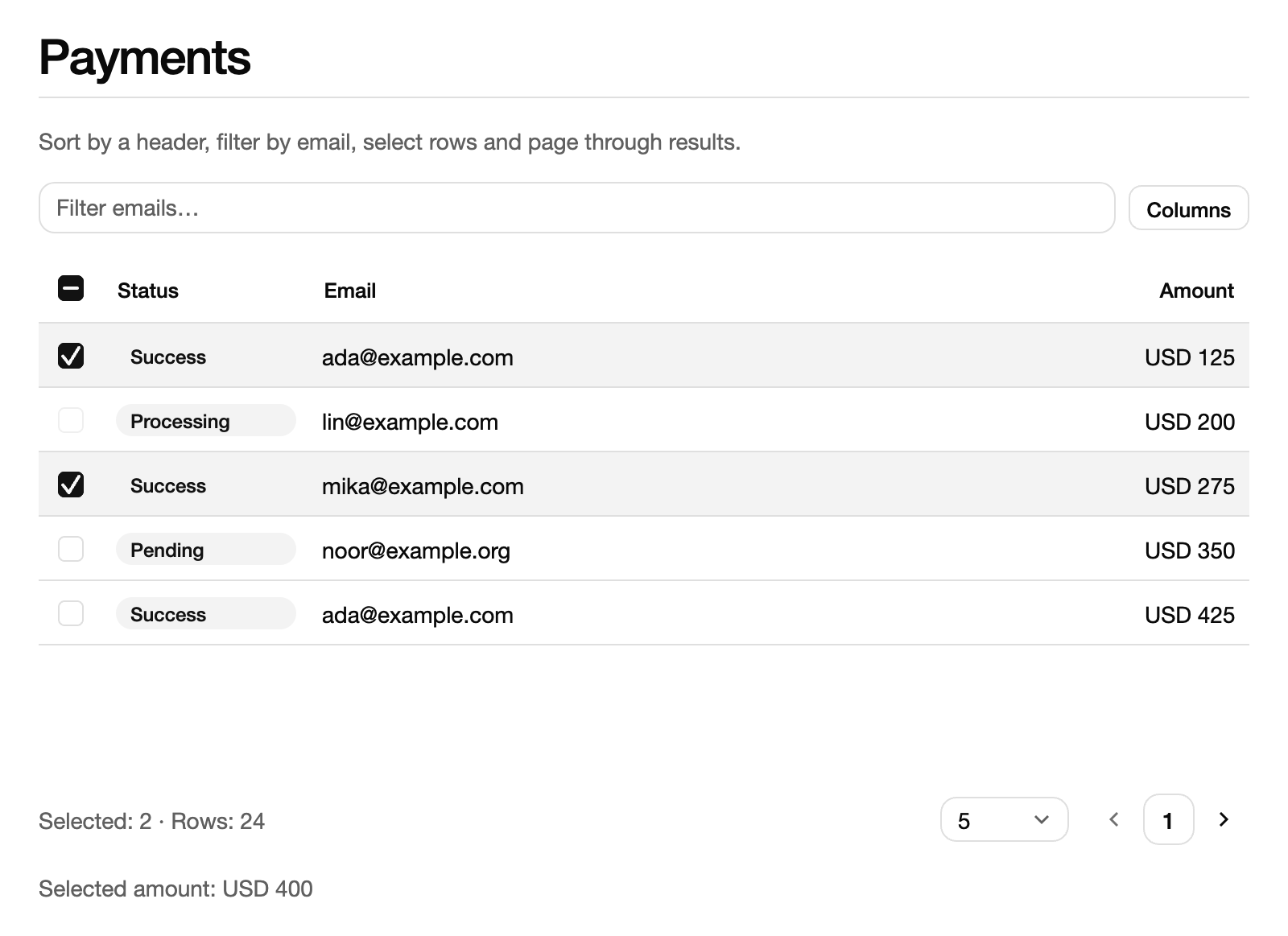
运行后,在筛选框中输入 ada,表格只剩 6 条 [email protected] 的付款,底部显示“Rows: 6”。选中几行,下方的“Selected amount”随之变化;切换页码时,其他页上的选择仍然保留。
23.4 第三步:行菜单与删除确认
第三步给每行加一个 … 菜单,提供“View details”和“Delete payment”两项;删除前弹出确认对话框。保存为 ui-project-step3.scoop(下载完整源码)。
先给 paymentColumns 增加两个回调参数,并增加一个操作列:
fun paymentColumns(onDetails: (Payment) -> Unit, onDelete: (Payment) -> Unit): Array<
    TableColumn<Payment>
> =
        TableColumn(
            "actions",
            "",
            { row -> component({ scope -> PaymentActions(row, onDetails, onDelete, scope) }) },
            TableColumnSize(GridTrack.Fixed(56.0), minimum = 48.0),
            hideable = false,
            resizable = false
        )
单元格不一定只能放文字。component({ scope -> ... }) 在单元格里挂载一个组件,它和其他组件一样有自己的状态和生命周期。操作列不需要隐藏或调整宽度,因此关闭了 hideable 和 resizable。
行菜单组件只保存“菜单是否展开”:
// Each row's menu keeps its own open state; the actions go back to the store.
class PaymentActions(
    private val row: Payment,
    private val onDetails: (Payment) -> Unit,
    private val onDelete: (Payment) -> Unit,
    scope: ComponentScope
): Component(scope) {
    private val open = state(false)
    public override fun render(): View {
        val row = this.row
        val onDetails = this.onDetails
        val onDelete = this.onDelete
        return dropdownMenu(
            open.binding(),
            menu {
                this.label(ViewKey.Text("title"), f"Payment ${row.id + 1L}")
                this.item(ViewKey.Text("details"), "View details", { onDetails(row) })
                this.separator(ViewKey.Text("separator"))
                this.item(ViewKey.Text("delete"), "Delete payment", { onDelete(row) }) {
                    this.destructive = true
                }
            }
        ) {
            this.trigger("…") {
                this.variant = ButtonVariant.Ghost
                this.size = ButtonSize.IconSm
            }
        }
    }
}
“菜单是否展开”只和这一行有关,所以放在组件自己的 state 中;“删除哪条记录”涉及整个应用,所以通过回调交给 Store。菜单每一项都有显式 key,destructive = true 把删除项显示为警示色。
Store 新增三项状态和三个操作:
    val status = state("Use a row menu to view or delete a payment.")
    val confirming = state(false)
    val pending = state<Payment?>(None)
paymentColumns({ row -> showDetails(row) }, { row -> askDelete(row) }),
    fun showDetails(row: Payment) {
        status.value = f"Payment ${row.id + 1L}: ${row.email}, USD ${row.amount}, ${row.status}."
    }
    fun askDelete(row: Payment) {
        pending.value = Some(row)
        confirming.value = true
    }
    // The alert dialog does not close itself on the action; the store decides.
    fun confirmDelete() {
        val row = pending.value ?: return
        confirming.value = false
        pending.value = None
        val next = ArrayList<Payment>()
        for (record in records)
            if (record.id != row.id)
                next.add(record)
        records = next.toArray()
        table.replaceData(TableData.Local(paymentRows(records)))
        status.value = f"Payment ${row.id + 1L} deleted."
    }
删除分成两步:askDelete 只记下待删除的记录并打开对话框;用户确认后,confirmDelete 才真正修改数据。修改记录后要调用 table.replaceData,把新数据交给表格。表格保留当前的排序、筛选和页码,并自动去掉已不存在的行的选择。
最后在 render 中加入状态文字和确认对话框:
val warning = label("The payment will be removed from this list.")
            this.typography(store.status.value, TypographyRole.Muted)
            this.alertDialog(store.confirming.binding(), warning) {
                this.title("Delete this payment?")
                this.description(store.pending.value?.email ?: "")
                this.cancel("Keep payment")
                this.action("Delete payment", { store.confirmDelete() }) {
                    this.variant = ButtonVariant.Destructive
                }
            }
alertDialog 的打开状态绑定到 Store 的 confirming。点击 cancel 按钮会通过这个绑定关闭对话框;action 按钮不会自动关闭对话框,由 confirmDelete 把 confirming 设回 false。这样设计是为了让应用自己决定什么时候关闭,例如提交失败时可以让对话框保持打开。对话框打开时,焦点默认落在 cancel 按钮上,误按 Enter 不会删除数据。
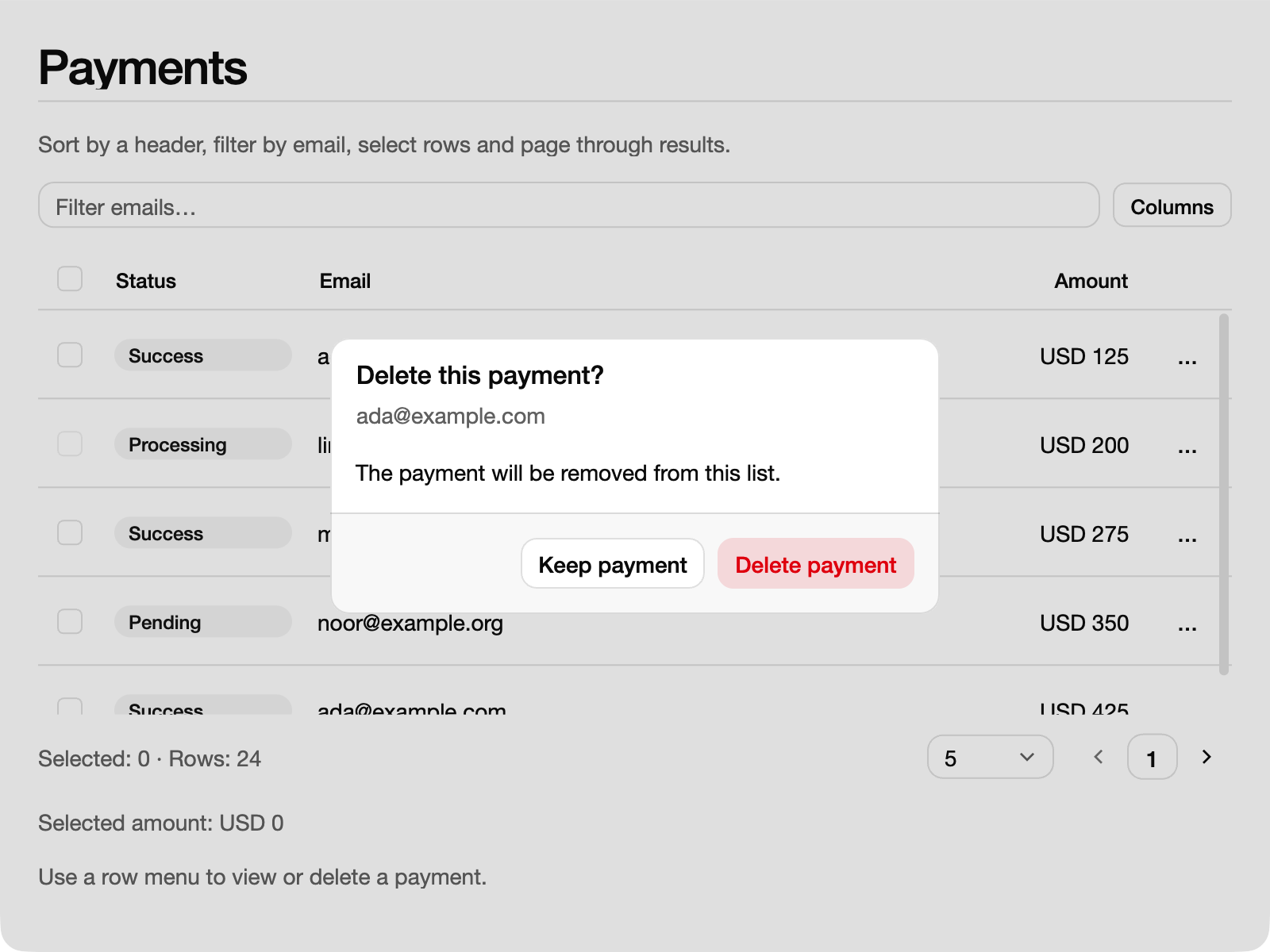
运行后点击某一行的 …,菜单显示“Payment N”、“View details”和红色的“Delete payment”。选择 Delete payment 后,页面变暗,弹出“Delete this payment?”对话框并显示该行的邮箱;点击“Keep payment”关闭对话框,数据不变;点击“Delete payment”后对话框关闭,底部的行数减 1,状态文字变为“Payment N deleted.”。
23.5 第四步:撤销与汇总联动
最后一步完成整个应用:删除后弹出带“Undo”按钮的通知,点击后把记录恢复到原来的位置;表格上方增加三张统计卡片和一张按状态统计的柱状图,它们随删除和恢复同步更新。保存为 ui-project-step4.scoop(下载):
//! dep: scoop:scoop.charset:0.1.0
//! dep: scoop:scoop.graphics:0.1.0
//! dep: scoop:scoop.ui:0.1.0
//! dep: scoop:scoop.ui.component:0.1.0
//! dep: scoop:scoop.ui.style:0.1.0
//! dep: scoop:scoop.ui.style.shadcn:0.1.0
import scoop.charset.unicodeCasefold
import scoop.graphics.Paint
import scoop.text.contains
import scoop.ui.*
import scoop.ui.component.*
import scoop.ui.style.Insets
import scoop.ui.style.ThemeSource
import scoop.ui.style.currentThemeSource
import scoop.ui.style.read
import scoop.ui.style.shadcn.shadcnTheme
import scoop.ui.text.TextEditorState

// One payment record. The id is stable and becomes the table row key.
class Payment(val id: Long, val email: String, val amount: Int, val status: String)

fun samplePayment(index: Long): Payment =
    Payment(
        index,
        ["[email protected]", "[email protected]", "[email protected]", "[email protected]"][index % 4L],
        (125L + index % 9L * 75L).toInt(),
        ["Success", "Processing", "Success", "Pending", "Success"][index % 5L]
    )

// Wrap every record with its stable key; the table never guesses identity.
fun paymentRows(records: Array<Payment>): TableRows<Payment> =
    TableRows(
        Array<TableRecord<Payment>>(records.size) {
            at -> TableRecord(ViewKey.Number(records[at].id), records[at])
        }
    )

fun paymentColumns(onDetails: (Payment) -> Unit, onDelete: (Payment) -> Unit): Array<
    TableColumn<Payment>
> =
    [
        TableColumn(
            "status",
            "Status",
            { row -> badge(row.status) { this.variant = ButtonVariant.Secondary } },
            TableColumnSize(GridTrack.Auto, minimum = 112.0, samples = ["Processing"]),
            compare = Some { a, b -> a.status.compareTo(b.status).toInt() }
        ),
        TableColumn(
            "email",
            "Email",
            { row -> label(row.email) },
            TableColumnSize(GridTrack.Fraction(1.0), minimum = 220.0),
            compare = Some { a, b -> a.email.compareTo(b.email).toInt() },
            filter =
                Some { row, text -> unicodeCasefold(row.email).contains(unicodeCasefold(text)) }
        ),
        TableColumn(
            "amount",
            "Amount",
            { row -> label(f"USD ${row.amount}") },
            TableColumnSize(GridTrack.Fixed(120.0), minimum = 100.0),
            alignment = AxisAlignment.End,
            compare = Some { a, b -> a.amount - b.amount }
        ),
        TableColumn(
            "actions",
            "",
            { row -> component({ scope -> PaymentActions(row, onDetails, onDelete, scope) }) },
            TableColumnSize(GridTrack.Fixed(56.0), minimum = 48.0),
            hideable = false,
            resizable = false
        )
    ]

// Each row's menu keeps its own open state; the actions go back to the store.
class PaymentActions(
    private val row: Payment,
    private val onDetails: (Payment) -> Unit,
    private val onDelete: (Payment) -> Unit,
    scope: ComponentScope
): Component(scope) {
    private val open = state(false)
    public override fun render(): View {
        val row = this.row
        val onDetails = this.onDetails
        val onDelete = this.onDelete
        return dropdownMenu(
            open.binding(),
            menu {
                this.label(ViewKey.Text("title"), f"Payment ${row.id + 1L}")
                this.item(ViewKey.Text("details"), "View details", { onDetails(row) })
                this.separator(ViewKey.Text("separator"))
                this.item(ViewKey.Text("delete"), "Delete payment", { onDelete(row) }) {
                    this.destructive = true
                }
            }
        ) {
            this.trigger("…") {
                this.variant = ButtonVariant.Ghost
                this.size = ButtonSize.IconSm
            }
        }
    }
}

// Totals shown above the table; recomputed from the records on every change.
class PaymentSummary(val count: Long, val total: Int, val pending: Long)

fun summarize(records: Array<Payment>): PaymentSummary {
    var total = 0
    var pending = 0L
    for (record in records) {
        total += record.amount
        if (record.status == "Pending")
            pending += 1L
    }
    return PaymentSummary(records.size, total, pending)
}

fun statusChart(records: Array<Payment>): ChartData {
    val names = ["Success", "Processing", "Pending"]
    return ChartData(
        Array<ChartDatum>(names.size) { at -> ChartDatum(ChartDatumKey(names[at]), names[at]) },
        [
            ChartSeries(
                ChartSeriesKey("payments"),
                "Payments",
                Array<Double?>(names.size) {
                    at ->
                    var count = 0.0
                    for (record in records)
                        if (record.status == names[at])
                            count += 1.0
                    Some(count)
                }
            )
        ]
    )
}

// The application owns the data and every UI state that depends on it.
class PaymentStore {
    val records = state(Array<Payment>(24L) { at -> samplePayment(at) })
    val filter = TextEditorState()
    val status = state("Use a row menu to view or delete a payment.")
    val confirming = state(false)
    val pending = state<Payment?>(None)
    val notifications = ToastState()
    val chart = ChartModel(statusChart(records.value))
    val table =
        DataTableState(
            TableData.Local(paymentRows(records.value)),
            paymentColumns({ row -> showDetails(row) }, { row -> askDelete(row) }),
            selectable = { row -> row.status != "Processing" }
        )
    init {
        table.setPageSize(5L)
    }

    val summary: PaymentSummary get() = summarize(records.value)

    fun applyFilter() {
        table.setFilter("email", filter.committedText)
    }
    fun showDetails(row: Payment) {
        status.value = f"Payment ${row.id + 1L}: ${row.email}, USD ${row.amount}, ${row.status}."
    }
    fun askDelete(row: Payment) {
        pending.value = Some(row)
        confirming.value = true
    }
    // One place pushes a new record list to every view that depends on it.
    private fun replaceRecords(next: Array<Payment>) {
        records.value = next
        table.replaceData(TableData.Local(paymentRows(next)))
        chart.replaceData(statusChart(next))
    }
    fun confirmDelete() {
        val row = pending.value ?: return
        confirming.value = false
        pending.value = None
        val current = records.value
        val next = ArrayList<Payment>()
        var position = -1L
        for (at in 0L ..< current.size) {
            if (current[at].id == row.id)
                position = at
            else
                next.add(current[at])
        }
        if (position < 0L)
            return
        replaceRecords(next.toArray())
        status.value = f"Payment ${row.id + 1L} deleted."
        val store = this
        val originalPosition = position
        notifications.show("Payment deleted") {
            this.kind = ToastKind.Success
            this.description(f"${row.email} · USD ${row.amount}")
            this.action("Undo", { store.restore(row, originalPosition) })
        }
    }
    // Put the same record object back where it was, unless it is already there.
    fun restore(row: Payment, position: Long) {
        val current = records.value
        for (record in current)
            if (record.id == row.id)
                return
        val at =
            if (position < current.size)
                position
            else
                current.size
        replaceRecords(
            Array<Payment>(current.size + 1L) {
                index -> if (index < at)
                    current[index]
                else
                    if (index == at)
                        row
                    else
                        current[index - 1L]
            }
        )
        status.value = f"Payment ${row.id + 1L} restored."
    }
    // Derived from the table's selection; nothing is copied into a second list.
    val selectedAmount: Int get() {
        var total = 0
        for (record in records.value)
            if (table.isSelected(ViewKey.Number(record.id)))
                total += record.amount
        return total
    }
}

fun statCard(title: String, value: String): View =
    card(
        column {
            this.typography(title, TypographyRole.Muted)
            this.typography(value, TypographyRole.H3)
            this.spacing = 4.0
        }
    ) { this.size = CardSize.Sm }

class PaymentsApp(private val store: PaymentStore, scope: ComponentScope): Component(scope) {
    private val theme = currentThemeSource()
    public override fun render(): View {
        val store = this.store
        val pageColor = this.theme.read(scope).tokens.palette.background.background
        val summary = store.summary
        val filterInput =
            input(store.filter) {
                this.placeholder = "Filter emails…"
                this.onEdited = { _ -> store.applyFilter() }
            }
        val warning = label("You can restore this payment from the notification.")
        val payments = statCard("Payments", f"${summary.count}")
        val volume = statCard("Total volume", f"USD ${summary.total}")
        val waiting = statCard("Pending", f"${summary.pending}")
        val content =
            column {
                this.typography("Payments", TypographyRole.H2)
                this.row {
                    this.item(payments) { this.grow = 1.0 }
                    this.item(volume) { this.grow = 1.0 }
                    this.item(waiting) { this.grow = 1.0 }
                    this.spacing = 12.0
                }
                this.chart(store.chart) {
                    this.kind = ChartKind.Bar
                    this.height = Some(140.0)
                    this.legend = false
                }
                this.dataTable(store.table) {
                    this.bodyHeight = 280.0
                    this.pageSizes = [5L, 10L, 20L]
                    this.toolbar(filterInput)
                }
                this.typography(
                    f"Selected amount: USD ${store.selectedAmount}",
                    TypographyRole.Muted
                )
                this.typography(store.status.value, TypographyRole.Muted)
                this.alertDialog(store.confirming.binding(), warning) {
                    this.title("Delete this payment?")
                    this.description(store.pending.value?.email ?: "")
                    this.cancel("Keep payment")
                    this.action("Delete payment", { store.confirmDelete() }) {
                        this.variant = ButtonVariant.Destructive
                    }
                }
                this.toaster(store.notifications)
                this.spacing = 16.0
                this.padding = Insets.all(24.0)
                this.alignment = CrossAlignment.Stretch
            }
        // The page is taller than the default window, so the root scrolls.
        return frame(scrollArea(content)) { this.style { this.background(Some(Paint(pageColor))) } }
    }
}

fun main() {
    val store = PaymentStore()
    val source = ThemeSource(shadcnTheme())
    context(source) {
        runUiApplication("Payments", { scope -> PaymentsApp(store, scope) })
    }
}
运行:
scoop run ui-project-step4.scoop --release
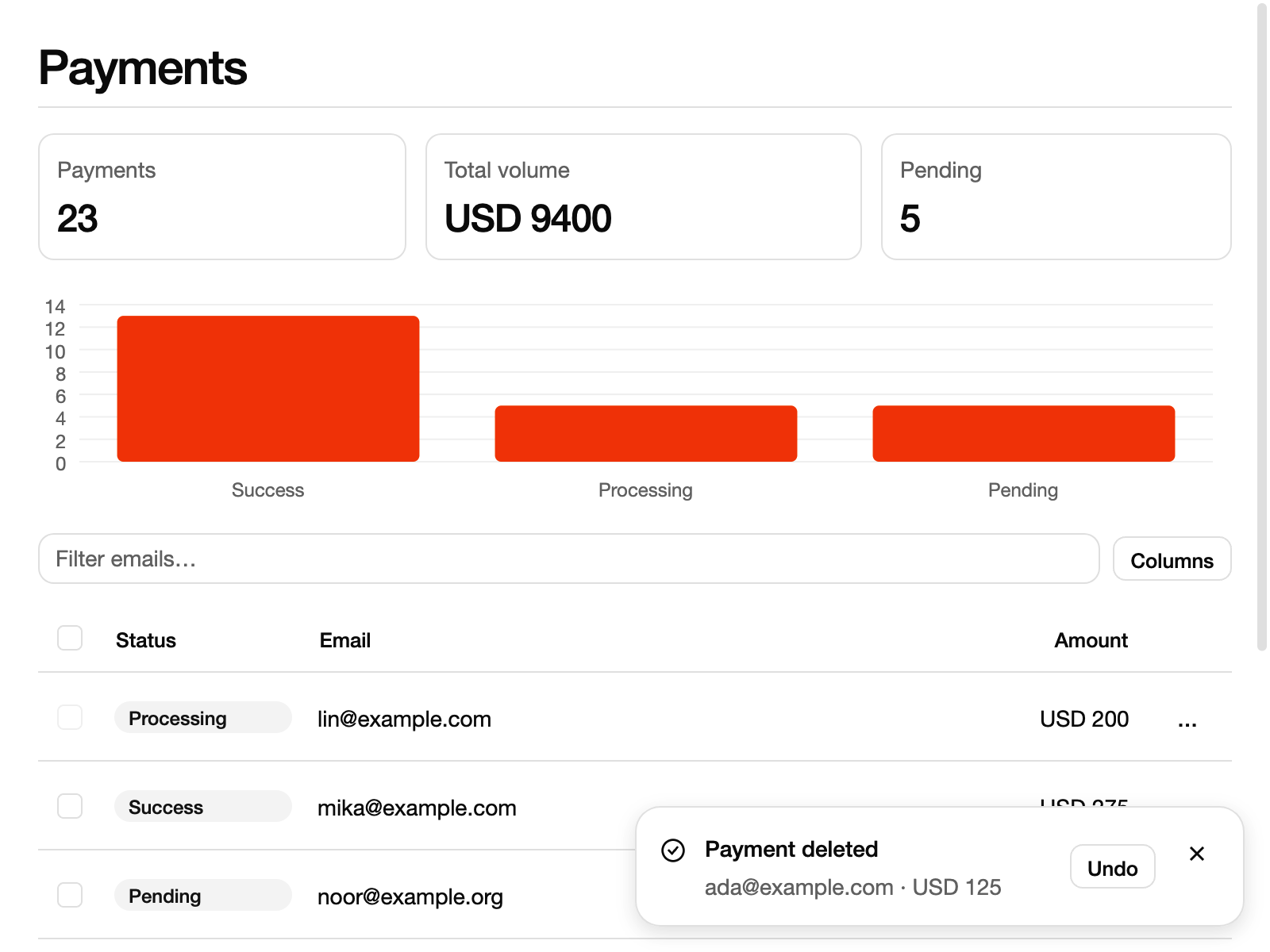
窗口顶部显示三张卡片:Payments 24、Total volume USD 9525、Pending 5;下面是柱状图,Success 14、Processing 5、Pending 5。删除一条 Success 状态、金额 425 的付款后,卡片变为 23 和 USD 9100,Success 柱降到 13;窗口右下角滑出“Payment deleted”通知,显示邮箱和金额,旁边有“Undo”按钮。5 秒内点击 Undo,通知关闭,记录回到表格中原来的位置,卡片和图表恢复原值。页面比默认窗口高,可以用滚轮滚动查看表格和底部的状态文字。
这一步相对第三步有以下改动。
记录列表改为 State。
val records = state(Array<Payment>(24L) { at -> samplePayment(at) })
第三步中 records 只在 Store 内部使用,每次修改后会调用 replaceData,表格因此刷新。现在 render 还要直接读取 store.summary,而它由 records 计算得出。只有读取的是 State,组件才会在它变化后重新渲染;普通 var 变了,界面不会知道。
派生数据集中在一个地方更新。
    // One place pushes a new record list to every view that depends on it.
    private fun replaceRecords(next: Array<Payment>) {
        records.value = next
        table.replaceData(TableData.Local(paymentRows(next)))
        chart.replaceData(statusChart(next))
    }
删除和恢复都只调用 replaceRecords。以后再加一个依赖记录的视图,也只需要改这一处。统计卡片不用单独存储,summary 每次从 records.value 重新计算;图表的 ChartModel 还保存了“隐藏了哪些系列”等界面状态,所以用 replaceData 替换数据,而不是每次新建一个模型。
删除时记住原位置,并显示通知。confirmDelete 在过滤记录的同时记下被删记录的下标,然后调用 notifications.show:
        val store = this
        val originalPosition = position
        notifications.show("Payment deleted") {
            this.kind = ToastKind.Success
            this.description(f"${row.email} · USD ${row.amount}")
            this.action("Undo", { store.restore(row, originalPosition) })
        }
show 后面的 lambda 是通知的配置块,里面的 this 是通知 builder,所以先把 Store 存进局部变量 store。通知默认显示 5 秒,action 按钮点击后会自动关闭通知。
恢复操作可以重复调用。restore 先检查记录是否已经存在,存在就直接返回;否则把同一个 Payment 对象插回原下标(如果期间又删了别的记录,原下标超出范围,就放到末尾)。恢复的是原来的对象,编号不变,表格 key 也就不变。
通知与对话框放在同一棵树中。
this.toaster(store.notifications)
toaster 是 ToastState 的显示位置,同一个 ToastState 只能绑定一个活动的 toaster。和 alertDialog 一样,它写在 column 里,但通知卡片显示在窗口的弹出层中,位置相对窗口(默认右下角),而不是跟着 column 中的位置。
页面可以滚动。卡片、图表和表格加在一起比默认的 800×600 窗口高。第二、三步中,内容超出窗口时,表格正文会被压缩,只能显示四行多一点。这里把整个 column 放进 scrollArea,并把内边距移到 column 上:
        // The page is taller than the default window, so the root scrolls.
        return frame(scrollArea(content)) {
            this.style { this.background(Some(Paint(pageColor))) }
        }
需要固定窗口大小时,可以改用桌面集成中的 UiHost 和 windowAttributes { size = ... } 创建窗口。
23.6 回顾:用到了哪些知识
| 本项目中的做法 | 对应章节 |
|---|---|
column/row/frame、item { grow = 1.0 }、背景与对齐 |
布局与文字 |
Store 持有业务数据,组件只呈现;state、binding()、派生值 |
状态与数据流 |
TextEditorState 与 input、onEdited |
输入与表单 |
对话框默认聚焦 cancel、scrollArea 与虚拟化的表格正文 |
焦点与滚动 |
dropdownMenu、alertDialog、ToastState/toaster |
弹层与导航 |
DataTableState/dataTable、card、ChartModel/chart |
数据展示 |
ThemeSource(shadcnTheme())、currentThemeSource()、按钮 variant |
主题与样式 |
| 窗口大小与应用根 | 桌面与异步 |
不启动窗口测试 confirmDelete/restore |
测试 UI |
23.7 继续扩展
这个应用的结构可以继续扩展。下面几个方向都只需要在现有结构上增加代码:
- 行内编辑。给
Payment增加一个val note = TextEditorState(""),再增加一列,单元格写成{ row -> input(row.note) { ... } }。编辑状态保存在记录对象里,所以排序、翻页、删除后撤销,备注都会保留。官方 Gallery 的 Data 页面就是这样做的。 - 明暗切换。
ThemeSource.current是一个 State。加一个按钮,执行source.current.value = shadcnTheme(ThemeMode.Dark)即可切换到深色主题,控件和背景色会按新主题重绘,表格的数据和选择不受影响。 - 从右到左布局。用
direction(content, LayoutDirection.Rtl)包住页面,起止方向随之镜像:Start 对齐变成靠右,菜单等弹层也按 RTL 规则定位。可以用它检查布局里有没有写死“左”和“右”。 - 删除后的焦点去向。用
FocusHandle和FocusOptions指定焦点位置,例如对话框关闭后把焦点移到通知的 Undo 按钮上,让只用键盘的用户也能撤销。 - 服务端分页。数据量很大时,把
TableData.Local换成TableData.Provided(rows, totalRows),并在onQueryChange中按TableQuery请求对应的页;后台加载的写法见桌面与异步。 - 为 Store 写测试。删除、撤销、重复撤销、删除后再删除别的记录等情况,都可以直接调用 Store 的方法来测试。
23.8 常见错误与继续阅读
| 现象 | 原因与改法 |
|---|---|
编译报 dependency function argument must be of type View, found Unit |
在 column { ... } 里直接调用了 label(...)、input(...) 等,解析成了 builder 的成员方法。先在 builder 外用局部变量创建 View,再传进去 |
| 编译报 implicit use of an outer receiver is not allowed | 在 builder lambda 中直接使用了组件成员。在 render 开头写 val store = this.store |
编译报 unknown function Insets |
缺少 import scoop.ui.style.Insets。全部内边距相同时用 Insets.all(24.0) |
| 窗口是黑底,文字看不清 | 根 View 没有铺背景。用 frame(...) { style { background(...) } } 铺上主题背景色 |
| 点击对话框的 action 后对话框不关闭 | AlertDialog 的 action 不负责关闭,在操作中把绑定的 State 设为 false |
| 删除或排序后,选中状态跑到了别的行 | 行 key 用了数组下标。改用业务编号 ViewKey.Number(id) |
| 表格已更新,统计卡片或图表还是旧数据 | 只调用了 table.replaceData,或 render 读取的是普通 var。把记录放进 State,并在一个函数里更新所有依赖它的视图 |
| 撤销后同一条记录出现两次 | restore 没有检查记录是否已经存在。先检查编号再插入 |
| 表格只显示四行多,下面被截断 | 页面内容超过窗口高度,表格正文被压缩。把页面放进 scrollArea,或创建更大的窗口 |
要查看本篇用到的控件的完整用法,可以阅读工具链附带的 scoop.ui.component README,以及 shadcn Gallery 示例中的 app_data.scoop、app_data_model.scoop 和 table_model.scoop,它们是本篇示例的完整版本。要继续了解单个控件,回到数据展示和弹层与导航;全套目录见总览。
下一章用卡片翻页演示如何让轻扫、键盘和读屏器操作同一份状态。触摸、手势与无障碍