 Scoop
UI 教程:测试 UI
本篇是 UI 教程的第 22 章:介绍如何用 scoop test 和 scoop.test 库测试 UI 程序。先测试不需要窗口的状态和业务逻辑,再在隐藏的原生窗口中测试组件,最后说明需要真实绘制的测试有哪些条件。上一篇:桌面集成与异步;下一篇:综合项目。
22. 测试 UI
22.1 先把逻辑放进业务类
UI 测试最省事的做法,是让大部分逻辑根本不需要窗口。state(initial) 创建的 State 是普通对象,可以放在任何类中,在测试里直接创建、读写和断言(见状态与数据流)。因此建议这样组织代码:
- 业务规则(校验、增删、派生文字)写在普通类中,State 也放在这里;
- 组件的 render 只读取这些 State 并组合控件,回调只调用业务类的方法。
这样,绝大多数行为都可以用几毫秒的纯状态测试覆盖;只有“组件能否正确挂载、是否随状态更新”这类问题才需要原生窗口。
22.2 一个可测试的 Cone
测试库 scoop.test 要写进 Cone.toml 的 [test-dependencies],测试代码放在 tests/ 目录中,所以这里使用一个 Cone 项目,而不是单文件程序。本章的例子是一个购物清单程序,目录结构如下(Cone.toml):
ui-testing-cone/
├── Cone.toml
├── src/
│   ├── main.scoop
│   └── shopping.scoop
└── tests/
    ├── list.scoop
    └── window.scoop
Cone.toml 把正式代码的依赖放在 [dependencies] 中,只供测试使用的库放在 [test-dependencies] 中,它们不会进入正式构建的程序:
schema = 1

[cone]
group = "guide.examples"
name = "ui-testing"
version = "0.1.0"
kind = "executable"

[dependencies]
"scoop:scoop.core" = "0.1.0"
"scoop:scoop.std" = "0.1.0"
"scoop:scoop.graphics" = "0.1.0"
"scoop:scoop.ui" = "0.1.0"
"scoop:scoop.ui.component" = "0.1.0"
"scoop:scoop.ui.style" = "0.1.0"
"scoop:scoop.ui.style.macos" = "0.1.0"
"scoop:scoop.window" = "0.1.0"

[test-dependencies]
"scoop:scoop.test" = "0.1.0"
"scoop:scoop.platform" = "0.1.0"
"scoop:scoop.surface" = "0.1.0"
源码的 package 必须是 Cone 的 group 或它的子包,这里 group 为 guide.examples,所以使用 package guide.examples.shopping。测试文件使用同一个包,可以直接访问 src 中的声明。
src/shopping.scoop 包含业务类 ShoppingList 和组件 ShoppingView(下载):
package guide.examples.shopping

import scoop.graphics.Paint
import scoop.ui.*
import scoop.ui.component.*
import scoop.text.trim
import scoop.ui.style.currentThemeSource

/** Business state: plain class, testable without any window. */
class ShoppingList {
    val items = state<Array<String>>([])
    val limit = 5L

    val summary: String get() =
        when (items.value.size) {
            case 0L -> "Nothing to buy"
            case 1L -> "1 item"
            else -> f"${items.value.size} items"
        }

    /** Adds a trimmed, non-empty, non-duplicate item; returns whether it was added. */
    fun add(text: String): Boolean {
        val name = text.trim()
        if (name == "" || items.value.size >= limit)
            return false
        for (existing in items.value)
            if (existing == name)
                return false
        val next = ArrayList<String>()
        for (existing in items.value)
            next.add(existing)
        next.add(name)
        items.value = next.toArray()
        return true
    }

    fun clear() {
        items.value = []
    }
}

class ShoppingView(private val list: ShoppingList, scope: ComponentScope): Component(scope) {
    private val theme = currentThemeSource()
    public override fun render(): View {
        val pageColor = this.theme.current.value.tokens.palette.background.background
        val list = this.list
        return frame(
            column {
                spacing = 10.0
                label(list.summary)
                for (item in list.items.value)
                    label("• " + item)
                row {
                    spacing = 8.0
                    button("Add milk", { list.add("milk") })
                    button("Add bread", { list.add("bread") })
                    button("Clear", { list.clear() }) { enabled = list.items.value.size > 0L }
                }
            }
        ) { style { background(Some(Paint(pageColor))) } }
    }
}
ShoppingList 中的规则:去掉首尾空白,拒绝空项和重复项,最多 5 项;summary 是由 items 派生的文字。ShoppingView 只负责显示和转发点击。src/main.scoop 是普通入口(下载):
package guide.examples.shopping

import scoop.ui.*
import scoop.ui.style.ThemeMode
import scoop.ui.style.ThemeSource
import scoop.ui.style.macos.macosTheme

fun main() {
    val list = ShoppingList()
    context(ThemeSource(macosTheme(ThemeMode.Light))) {
        runUiApplication("Shopping", { scope -> ShoppingView(list, scope) })
    }
}
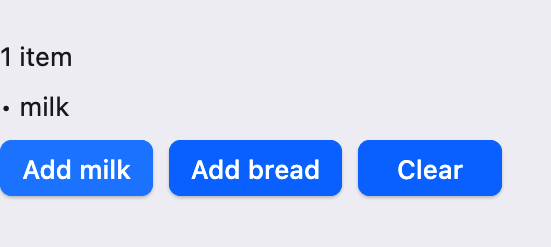
在 Cone 目录的上一级运行 scoop run ui-testing-cone --release,可以看到这个窗口:顶部是 Nothing to buy,下面三个按钮;点 Add milk 后出现 • milk,摘要变为 1 item。
22.3 纯状态测试
tests/list.scoop 直接测试 ShoppingList,不创建任何窗口(下载):
package guide.examples.shopping

import scoop.test.*

@Test
private class ShoppingListTests {
    private val list = ShoppingList()

    @Test
    fun `adding trims text and updates the summary`() {
        assertEquals("Nothing to buy", list.summary)
        assertTrue(list.add("  milk "))
        assertEquals("milk", list.items.value[0L])
        assertEquals("1 item", list.summary)
    }

    @Test
    fun `empty and duplicate items are rejected`() {
        assertFalse(list.add("   "))
        assertTrue(list.add("milk"))
        assertFalse(list.add("milk"))
        assertEquals(1L, list.items.value.size)
    }

    @Test
    fun `the list stops at its limit`() {
        for (name in ["a", "b", "c", "d", "e"])
            assertTrue(list.add(name))
        assertFalse(list.add("f"))
        assertEquals("5 items", list.summary)
        list.clear()
        assertEquals("Nothing to buy", list.summary)
    }

    @Test
    fun `a binding writes through to the same state`() {
        val items = list.items.binding()
        items.value = ["tea"]
        assertEquals("1 item", list.summary)
    }
}
运行测试:
scoop test ui-testing-cone --release
scoop test 构建并运行 tests/ 中的测试,参数是 Cone 目录(省略时使用当前目录的 Cone.toml)。输出中这组测试为:
ui-testing
  guide.examples.shopping.ShoppingListTests [passed]
    adding trims text and updates the summary (tests/list.scoop:9:5) passed (19000 ns)
    empty and duplicate items are rejected (tests/list.scoop:17:5) passed (2000 ns)
    the list stops at its limit (tests/list.scoop:25:5) passed (3000 ns)
    a binding writes through to the same state (tests/list.scoop:35:5) passed (1000 ns)
(下一节的窗口测试也会一起运行;耗时因机器而异。)scoop.test 的用法:
- 用
@Test同时标注测试类和其中的测试方法。方法名可以用反引号写成一句话,失败报告中会原样显示。 - 每个测试方法使用一个新的类实例,所以字段
private val list = ShoppingList()在每个测试开始时都是空的,测试之间互不影响。需要公共准备和收尾时,分别用@BeforeTest、@AfterTest标注方法;收尾在测试失败时也会执行。 - 断言函数有
assertEquals(expected, actual)、assertNotEquals、assertTrue、assertFalse、assertSame(同一个引用)、assertFailsWith<E> { ... }(代码块应抛出 E 类型的异常),以及直接失败的fail(Some("message"))。 @Ignore("reason")标注的测试默认跳过,用--ignored只运行它们。--filter <text>只运行完整名称(含类名)包含该文字的测试,--list只列出测试而不运行,--no-run只构建不运行。
最后一个测试说明 Binding 不保存副本:通过 list.items.binding() 写入,读到的仍是同一个 State。控件的 Binding 参数也可以这样在测试中替代用户操作。
22.4 在隐藏窗口中测试组件
纯状态测试不能回答这些问题:组件能否正常挂载?render 是否真的读取了正确的 State,从而在数据变化后更新?窗口关闭时组件是否卸载?这需要真实的 Application 和 UiHost,但窗口不必显示出来。
tests/window.scoop 中只有一个测试(下载):
package guide.examples.shopping

import scoop.graphics.Point
import scoop.platform.time.MonotonicTimeSource
import scoop.surface.FrameSubmission
import scoop.test.*
import scoop.time.Duration
import scoop.ui.*
import scoop.ui.style.ThemeMode
import scoop.ui.style.ThemeSource
import scoop.ui.style.macos.macosTheme
import scoop.window.*

@Test
private class ShoppingWindowTests {
    // A process can create only one Application, so keep native-window checks in one test.
    @Test
    fun `a hidden window follows shared state and a shown window presents a frame`() {
        val probe = WindowProbe()
        context(ThemeSource(macosTheme(ThemeMode.Light))) {
            UiHost { host, active, event -> probe.event(host, active, event) }.use {
                host -> Application().run(host)
            }
        }
        assertEquals(3, probe.step)
        assertEquals(1, probe.unmounts)
    }
}

private class WindowProbe {
    val list = ShoppingList()
    var step = 0
    var renders = 0
    var rendered = ""
    var acceptedFrames = 0
    var unmounts = 0
    private var window: Window? = None

    fun event(host: UiHost, active: ActiveApplication, event: ApplicationEvent) {
        when (event) {
            case Resumed -> {
                val created =
                    active.createWindow(
                        windowAttributes {
                            title = "Shopping test"
                            size = LogicalSize(320.0, 240.0)
                            visible = false
                        }
                    )
                window = Some(created)
                // Fail instead of hanging if a step never arrives.
                created.createDeadline { fail(Some(f"window test stalled at step ${step}")) }
                .schedule(MonotonicTimeSource.markNow() + Duration.seconds(10L))
                when (host.attach(created, { scope -> SummaryProbe(this, scope) })) {
                    case Some(_) -> {}
                    case None -> fail(Some("mounting failed"))
                }
                next(active)
            }
            else -> {}
        }
    }

    // Each step runs as a separate owner-thread callback, after earlier UI updates.
    fun next(active: ActiveApplication) {
        assertTrue(active.proxy().post { application -> advance(application) })
    }

    private fun advance(active: ActiveApplication) {
        when (step) {
            case 0 -> {
                // Mounting rendered once; a hidden window draws nothing.
                assertEquals(1, renders)
                assertEquals("Nothing to buy", rendered)
                assertEquals(0, acceptedFrames)
                list.add("milk")
                step = 1
                next(active)
            }
            case 1 -> {
                // The state change re-rendered the root without waiting for a frame.
                assertEquals(2, renders)
                assertEquals("1 item", rendered)
                assertEquals(0, acceptedFrames)
                step = 2
                // Showing and focusing the window lets the system start drawing it.
                window!!.setVisible(true)
                window!!.requestFocus()
            }
            else -> fail(Some(f"unexpected step ${step}"))
        }
    }

    // Called by FrameProbe after the compositor accepted a real frame.
    fun frameAccepted(active: ActiveApplication) {
        acceptedFrames += 1
        if (step == 2) {
            step = 3
            active.requestExit()
        }
    }
}

// Test-only root: records what it read, then renders the real view inside a frame probe.
private class SummaryProbe(private val probe: WindowProbe, scope: ComponentScope): Component(
    scope
) {
    public override fun render(): View {
        val probe = this.probe
        probe.renders += 1
        probe.rendered = probe.list.summary
        return element(
            { mount -> FrameProbe(probe, mount) },
            [component({ mount -> ShoppingView(probe.list, mount) })]
        )
    }
    public override fun onUnmount() {
        probe.unmounts += 1
    }
}

// A pass-through element that reports completed frames.
private class FrameProbe(private val probe: WindowProbe, scope: ComponentScope): Element<Unit>(
    scope
) {
    public override fun measure(context: MeasureContext, constraints: Constraints): LayoutResult<
        Unit
    > {
        val size = context.measureChild(0L, constraints)
        context.placeChild(0L, Point(0.0, 0.0))
        return LayoutResult(size, Unit)
    }
    public override fun scene(context: SceneContext, measured: Unit) {
        context.children()
        val probe = this.probe
        val active = scope.application
        context.onFrameComplete {
            frame -> when (frame.submission) {
                case Accepted -> probe.frameAccepted(active)
                else -> {}
            }
        }
    }
}
这个测试的思路:
一个进程只能有一个 Application。 同一个 Cone 的测试运行在同一个进程中,而 Application 每个进程只能创建和运行一次。所以把需要原生窗口的检查集中在一个测试里;确实需要多次启动应用时,把它们放进不同的测试 Cone。
隐藏窗口照样更新。 窗口用 visible = false 创建。隐藏的窗口不绘制,但挂载、render、State 更新和卸载照常进行,不需要等待任何帧,所以这部分测试既快又不依赖桌面环境的可见状态。
用探针组件记录 render 的结果。 View 是不透明的描述,测试不能直接读取“界面上显示了什么”。SummaryProbe 是只在测试中使用的根组件:它在 render 中读取 probe.list.summary,把读到的值和 render 次数记在普通字段中,再把真正的 ShoppingView 作为子组件渲染出来。真实组件因此也完整地挂载和更新了一遍。
每一步是一次独立的投递。 测试在 Resumed 中挂载窗口后,用 active.proxy().post { ... } 安排第一步。修改 State 后,框架会安排一次更新;随后投递的下一步排在这次更新之后执行,所以在下一步中就能断言 render 已经发生:第 0 步确认初次挂载 render 了一次、显示 Nothing to buy;它调用 list.add("milk") 后,第 1 步确认 render 次数变为 2、显示 1 item,而且始终没有绘制过任何帧。
不要让测试挂起。 如果某一步因为程序错误永远不会到来,事件循环会一直等待。created.createDeadline { ... }.schedule(...) 登记了一个 10 秒的截止时间,到期时 fail(...) 让测试失败。回调中的断言失败会结束事件循环,测试报告会指出失败的断言及其所在行,例如:
    a hidden window follows shared state and a shown window presents a frame (tests/window.scoop:17:5) failed (136450000 ns)
      body at guide.examples:ui-testing:0.1.0/tests/window.scoop:83:17
      assertEquals: assertion failed
      expected: 2 items
      actual: 1 item
结束后检查清理。 最后一步调用 requestExit()。Application.run 返回后,UiHost.use 关闭宿主,所有组件卸载。测试在 run 返回后断言 unmounts == 1,确认 onUnmount 恰好执行了一次。
22.5 等待真实的帧
有时需要确认窗口真的画出来了,例如检查第一帧是否成功提交。示例的第 1 步之后调用 window.setVisible(true) 和 requestFocus() 显示窗口,然后等待第一帧:
FrameProbe是一个透传的自绘元素(写法见自绘元素),它原样测量、放置唯一的子项;- 它在
scene中用context.onFrameComplete { frame -> ... }登记本帧完成后的一次性通知;frame.submission为Accepted表示这一帧已被系统接受; - 收到第一个 Accepted 帧后,测试进入第 3 步并退出应用。
这类测试有几个限制,使用前要了解:
- 需要真实的桌面会话。 被遮挡、未显示的窗口,以及锁屏或没有显示器的会话,系统可能不为窗口安排绘制,测试就会等到截止时间后失败。示例在显示窗口后请求焦点,使它出现在最前面。在没有桌面的持续集成环境中,可以给这类测试加上
@Ignore("needs a desktop session"),在有桌面的机器上用--ignored单独运行。 - 读回像素不在公开接口中。 工具链自身的测试会读取窗口像素、模拟点击和输入法,它们使用的是工具链源码树中的内部测试辅助库(例如
scoop.tests:surface-native),这些库不随正式库发布,也不保证接口稳定,不建议应用依赖。应用一般用纯状态测试覆盖逻辑,用上面的隐藏窗口测试覆盖组件的挂载与更新,最终的视觉效果靠人工检查或截图。 - 没有公开的输入模拟。 测试不能替用户“点击按钮”。这正是 22.1 节建议让回调保持简单的原因:回调只调用业务方法,测试直接调用同一个方法即可。
22.6 在 Linux 和 Windows 上运行窗口测试
Linux(GNU,x86_64)的 Wayland 和 X11 后端都使用 GTK 4 与 libadwaita,测试需要一个有效的显示会话。用环境变量 SCOOP_WINDOW_BACKEND 选择后端:
SCOOP_WINDOW_BACKEND=wayland scoop test ui-testing-cone --release
SCOOP_WINDOW_BACKEND=x11 scoop test ui-testing-cone --release
不设置时,存在 WAYLAND_DISPLAY 就使用 Wayland,否则使用 X11。所选的显示服务器连接失败时直接报错,不会自动改用另一个。DISPLAY、WAYLAND_DISPLAY 和 XDG_RUNTIME_DIR 按显示系统的常规约定设置。两个后端的行为有少量差异(例如 Wayland 不提供窗口的全局位置),涉及这些能力的测试应在两个后端上各运行一次。
Windows 上,通过 SSH 等非交互会话运行时无法创建原生 Application。在这种环境中用 sco test ui-testing-cone --release --no-run 只检查测试能否构建,在登录的桌面会话中再实际运行;也可以把窗口测试标注为 @Ignore,在桌面上用 --ignored 运行。
22.7 验证手势和读屏器操作
在桌面会话中运行翻页示例。先用 Tab 找到“下一页”并用空格激活,再用 VoiceOver、讲述人或 Orca 按名称执行同一按钮。两次都应只翻一页,标题随之更新。用支持的设备在卡片上轻扫,检查方向和结果。如果读屏器占用了系统手势,可以用按钮完成同一操作。
检查自绘复选框时,除名称外还要读取角色和勾选状态,执行切换后核对界面的计数。对话框打开时,确认读屏器只能操作模态内容,关闭后可以回到触发控件。更多文本选区、虚拟列表和真实设备用例见框架的交互验证步骤。
常见错误与继续阅读
| 现象 | 原因与处理 |
|---|---|
报 package … must equal Cone group … |
源码和测试的 package 必须是 Cone group 或其子包 |
import scoop.test.* 找不到 |
scoop:scoop.test 没有写进 [test-dependencies] |
第二个窗口测试报 one Application per process |
同一测试进程只能创建一个 Application;合并成一个测试,或拆到另一个测试 Cone |
| 窗口测试一直不结束 | 某一步没有被安排或条件永远不满足;用 createDeadline 设置截止时间 |
| 修改 State 后立即断言,render 次数没变 | 更新是异步安排的;在下一次 proxy.post 的步骤中再断言 |
| 等待帧的测试偶尔超时 | 窗口被遮挡、未聚焦或会话锁屏;在可见的桌面上运行,或标注 @Ignore 单独运行 |
| 测试之间互相影响 | 不要在顶层对象中保存可变状态;每个测试方法都会得到新的类实例,状态放在字段中 |
下一篇综合项目把前面各篇的内容组合成一个完整的应用。scoop.test 的更多示例见工具链附带的 <Root>/src/scoop.test/examples(<Root> 是 scoop-install show 显示的工具链根目录)。