 Scoop
UI 教程:状态与数据流
本篇是 UI 教程的第 5 章。前两篇的界面基本是静态的;真实应用中,数据会在组件之间流动:父组件把数据交给子组件,子组件修改父组件的值,多个组件共用同一份业务数据,后台任务把结果送回界面。本篇逐一讲解这些场景。上一篇:布局与文字;下一篇:输入与表单。
5. 状态模型详解
5.1 State:读取即依赖,写入即更新
state(initial) 创建一个 State<T>。组件中有两种常见写法:
private val celsius = state(20)      // State<Int>; read and write celsius.value
private var edits: Int by state(0)   // delegated property; read and write edits directly
两种写法的行为相同,区别只在访问方式。字段写法拿到的是 State 对象本身,可以把它取到局部变量、传给其他对象或生成 Binding,所以在 builder 块中更方便;委托写法读起来像普通属性。
框架对 State 的处理规则很简单:
- render 中读取即登记依赖。render 读了哪些 State,框架就记下这些依赖。State 被写入后,只有读过它的组件会重新 render,其他组件不受影响。
- 依赖每次 render 重新收集。例如
if (expanded.value) details.value else ""在expanded为 false 时不会读取details,此时修改details不会触发重新 render;条件改变后,订阅会随之替换。 - 写入会合并。一个回调里连续写多个 State,或者多次写同一个 State,只会安排一次更新,组件不会为每次写入各 render 一遍。
- State 不限于组件。它是普通对象,也可以放在任何业务类中,被多个组件读取(见 5.3)。
上一篇提到过,在带接收者的 builder 块中不能隐式访问组件成员。所以 render 的惯用开头是先把需要的 State 取到局部变量:
val celsius = this.celsius
val edits = this.edits
val celsius = this.celsius 取到的是 State 对象,块中可以读写 celsius.value;val edits = this.edits 通过委托读取了当前值,适合只显示、不修改的场合。
5.2 Props 与 Binding:在父子组件之间传值
下面的温度换算器有两个 Stepper 子组件,一个调摄氏度,一个调华氏度,但只有一份真实数据。保存为 ui-state-binding.scoop(下载):
//! dep: scoop:scoop.ui:0.1.0
//! dep: scoop:scoop.ui.component:0.1.0
//! dep: scoop:scoop.ui.style:0.1.0
//! dep: scoop:scoop.ui.style.macos:0.1.0
//! dep: scoop:scoop.graphics:0.1.0
//! dep: scoop:scoop.graphics.text:0.1.0
import scoop.graphics.Paint
import scoop.graphics.text.TextAlignment
import scoop.ui.*
import scoop.ui.component.*
import scoop.ui.style.*
import scoop.ui.style.macos.macosTheme

// Parent input for one Stepper: a caption and a Binding to someone else's value.
class StepperProps(val caption: String, val value: Binding<Int>, val step: Int)

class Stepper(private val props: Props<StepperProps>, scope: ComponentScope): Component(scope) {
    public override fun render(): View {
        // Copy what the builder lambdas need into locals first.
        val input = props.value
        val value = input.value
        // Outside the builder, label(...) is the top-level factory returning a View.
        val caption = frame(label(input.caption)) { width = Some(110.0) }
        val shown =
            frame(label(f"${value.value}") { settings { alignment = TextAlignment.Center } }) {
                width = Some(56.0)
            }
        return row {
            add(caption)
            button("-", { value.value -= input.step })
            add(shown)
            button("+", { value.value += input.step })
            spacing = 8.0
            alignment = CrossAlignment.Center
        }
    }
}

class Converter(scope: ComponentScope): Component(scope) {
    private val theme = currentThemeSource()
    // The single source of truth, owned by this component.
    private val celsius = state(20)
    // A delegated State: read and write it like an ordinary property.
    private var edits: Int by state(0)

    public override fun render(): View {
        val celsius = this.celsius
        val edits = this.edits
        // A derived Binding: reads and writes go through celsius, no second copy.
        val fahrenheit =
            binding(
                get = { celsius.value * 9 / 5 + 32 },
                set = { next -> celsius.value = (next - 32) * 5 / 9 }
            )
        val counted =
            binding(
                get = { celsius.value },
                set = {
                    next ->
                    celsius.value = next
                    this.edits += 1
                }
            )
        val card =
            column {
                add(component(StepperProps("Celsius", counted, 5), { p, s -> Stepper(p, s) }))
                add(component(StepperProps("Fahrenheit", fahrenheit, 9), { p, s -> Stepper(p, s) }))
                label(f"Celsius edits: ${edits}")
                button("Reset", { celsius.value = 20 })
                spacing = 12.0
            }
        val page = this.theme.current.value.tokens.palette.background.background
        return frame(
            frame(card) {
                width = Some(380.0)
                padding = Some(Insets.all(20.0))
                surface = Some(SurfaceKind.Elevated)
            }
        ) { style { background(Some(Paint(page))) } }
    }
}

fun main() {
    val source = ThemeSource(macosTheme(ThemeMode.Light))
    context(source) {
        runUiApplication("Binding", { scope -> Converter(scope) })
    }
}
scoop run ui-state-binding.scoop --release
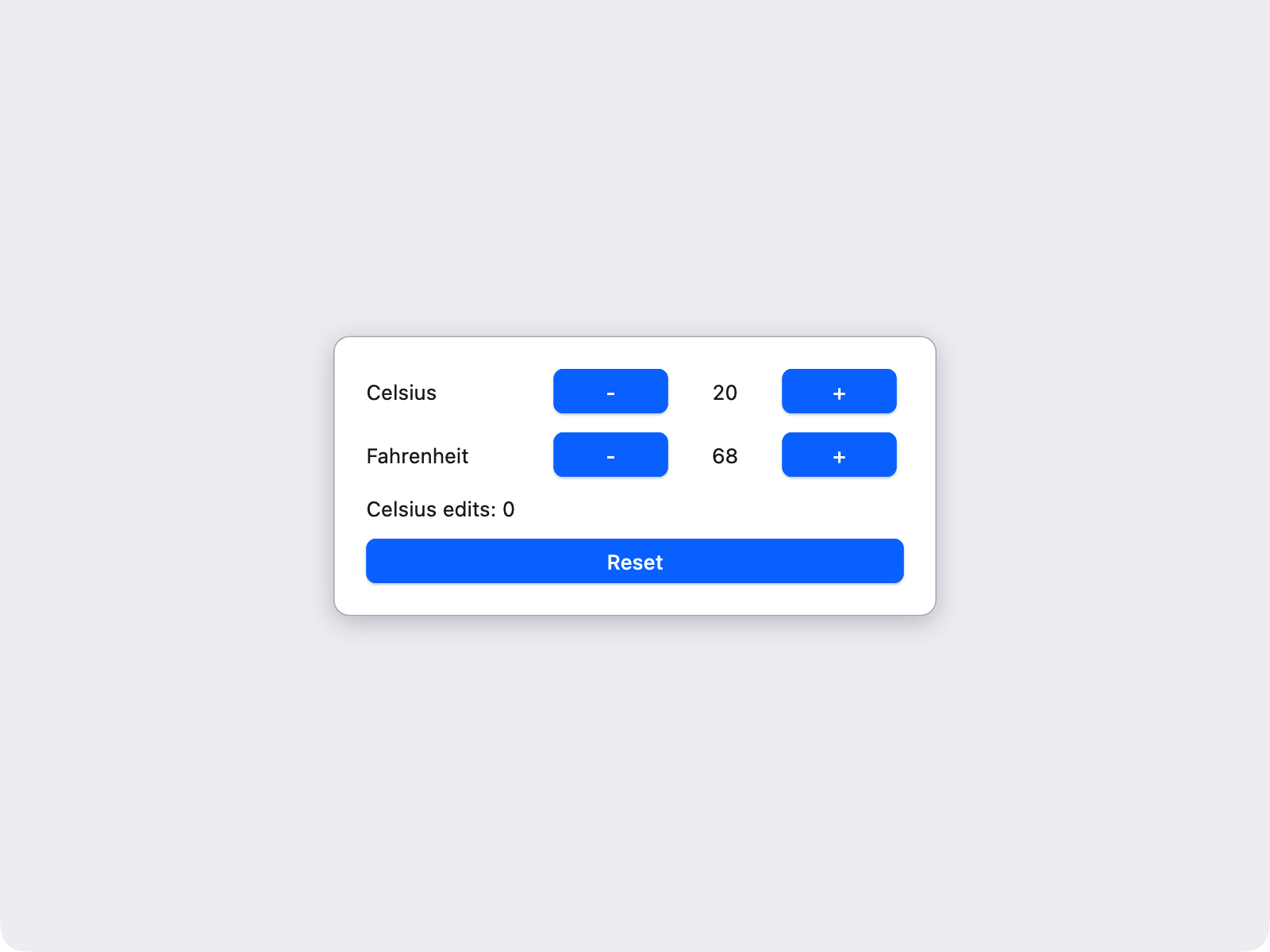
窗口中央是一张卡片:Celsius 一行显示 20,Fahrenheit 一行显示 68,下面是 Celsius edits: 0 和一个 Reset 按钮。点 Celsius 的 +,两行分别变为 25 和 77,编辑计数变为 1;点 Fahrenheit 的 +,华氏度增加 9,摄氏度随之增加 5,但编辑计数不变;点 Reset 回到 20 和 68。
Props:父级的输入。 component(props, create) 把一个 Props 值交给子组件。子组件的构造函数接收 Props<StepperProps>,在 render 中通过 props.value 读取父级最新一次 render 传入的值。父组件重新 render 时,同一位置的 Stepper 实例会保留,只是 props.value 被替换,然后 Stepper 重新 render。Props 只读,子组件不能直接修改它。
Binding:读写别人的值。 子组件需要修改父级数据时,父级传入一个 Binding<T>。Binding 本身不存储值,只是一对读写函数:
state.binding()直接读写这个 State;binding(get = { ... }, set = { next -> ... })自定义读写逻辑。
示例中的 fahrenheit 就是一个派生 Binding:读取时把摄氏度换算成华氏度,写入时再换算回来写入 celsius。counted 则在写入时额外累加编辑次数。两个 Stepper 看到的都只是 Binding<Int>,并不知道背后有一个 State 还是一段换算逻辑。
这种做法避免了数据的多份拷贝。子组件不需要保存一份“自己的温度”,再想办法与父级同步;单一的数据来源始终是 celsius。控件库中的控件也都这样工作,例如 checkbox(done.binding())、switchControl(enabled.binding()) 接收 Binding<Boolean>,用户操作控件时直接写回你的 State。
Stepper 的 render 中还有两处要留意:
val input = props.value、val value = input.value先把数据取到局部变量,原因同 5.1;caption和shown在row { ... }块外创建。在块中,label(...)是追加子项的成员函数,返回Unit,不能直接作为frame的参数(见上一篇布局与文字的 3.2 节)。
5.3 共享状态:业务 Store
当多个互不相干的组件需要同一份数据时,把 State 放进一个普通的业务类(这里称为 Store),而不是放在某个组件里。保存为 ui-state-store.scoop(下载):
//! dep: scoop:scoop.ui:0.1.0
//! dep: scoop:scoop.ui.component:0.1.0
//! dep: scoop:scoop.ui.style:0.1.0
//! dep: scoop:scoop.ui.style.macos:0.1.0
//! dep: scoop:scoop.graphics:0.1.0
import scoop.graphics.Paint
import scoop.ui.*
import scoop.ui.component.*
import scoop.ui.style.*
import scoop.ui.style.macos.macosTheme

class Task(val id: Long, val title: String, val done: Boolean)

// Plain business object: holds State, offers operations, knows nothing about views.
class TaskStore {
    val tasks =
        state(
            [
                Task(1L, "Write the layout chapter", false),
                Task(2L, "Review the state chapter", false),
                Task(3L, "Publish the guide", false)
            ]
        )
    val useKeys = state(true)

    fun setDone(id: Long, done: Boolean) {
        val current = tasks.value
        tasks.value =
            Array<Task>(current.size) {
                index ->
                val task = current[index]
                if (task.id == id) Task(task.id, task.title, done) else task
            }
    }

    fun reverse() {
        val current = tasks.value
        tasks.value = Array<Task>(current.size) { index -> current[current.size - 1L - index] }
    }
}

// Components obtain the store from the language Context installed in main.
context(store: TaskStore)
fun currentTaskStore(): TaskStore = store

// One row. `starred` is local to the row instance, not part of the store.
class TaskRow(private val props: Props<Task>, scope: ComponentScope): Component(scope) {
    private val store = currentTaskStore()
    private val starred = state(false)

    public override fun render(): View {
        val task = props.value
        val store = this.store
        val starred = this.starred
        val done = binding(get = { task.done }, set = { next -> store.setDone(task.id, next) })
        return row {
            checkbox(done)
            label(task.title)
            button(if (starred.value) "★" else "☆", { starred.value = !starred.value }) {
                variant = ButtonVariant.Ghost
            }
            spacing = 8.0
            alignment = CrossAlignment.Center
        }
    }
}

class TaskList(scope: ComponentScope): Component(scope) {
    private val store = currentTaskStore()

    public override fun render(): View {
        val tasks = store.tasks.value
        val keyed = store.useKeys.value
        return column {
            for (task in tasks) {
                // With a stable key the row instance (and its star) follows its task.
                val key = if (keyed) ViewKey.Number(task.id) else ViewKey.Position
                add(component(task, { p, s -> TaskRow(p, s) }, key))
            }
            spacing = 4.0
        }
    }
}

// A second component reading the same store: it updates whenever tasks change.
class Summary(scope: ComponentScope): Component(scope) {
    private val store = currentTaskStore()

    public override fun render(): View {
        var finished = 0
        for (task in store.tasks.value)
            if (task.done)
                finished += 1
        return label(f"${finished} of ${store.tasks.value.size} done")
    }
}

class TasksApp(scope: ComponentScope): Component(scope) {
    private val theme = currentThemeSource()
    private val store = currentTaskStore()

    public override fun render(): View {
        val store = this.store
        val keyed = store.useKeys.value
        val page = this.theme.current.value.tokens.palette.background.background
        val content =
            column {
                add(component({ s -> Summary(s) }))
                add(component({ s -> TaskList(s) }))
                row {
                    button("Reverse", { store.reverse() })
                    button(if (keyed) "Keys: on" else "Keys: off", {
                        store.useKeys.value = !store.useKeys.value
                    }) { variant = ButtonVariant.Outline }
                    spacing = 8.0
                }
                spacing = 16.0
                padding = Insets.all(24.0)
            }
        return frame(content) {
            alignment = Alignment(AxisAlignment.Start, AxisAlignment.Start)
            style { background(Some(Paint(page))) }
        }
    }
}

fun main() {
    val source = ThemeSource(macosTheme(ThemeMode.Light))
    val store = TaskStore()
    context(source) {
        context(store) {
            runUiApplication("Tasks", { scope -> TasksApp(scope) })
        }
    }
}
scoop run ui-state-store.scoop --release
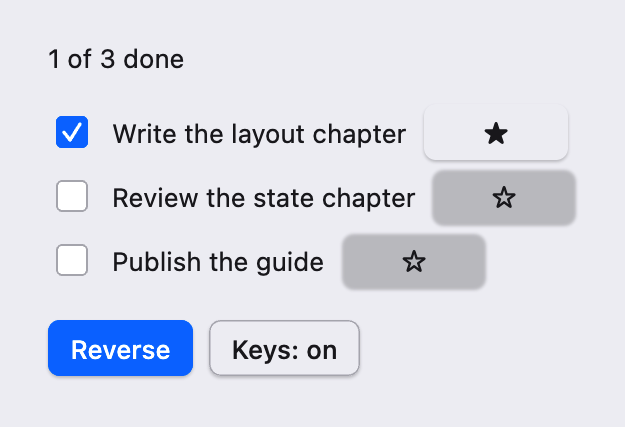
窗口左上角显示 0 of 3 done、三条任务和两个按钮。每条任务前有复选框,后面有一个星标按钮。勾选一条任务后,顶部的统计立即变为 1 of 3 done。
TaskStore 是普通 class:
tasks和useKeys是 State,保存业务数据;setDone、reverse是业务操作,它们整体替换tasks.value,从而通知所有读取者;- 它不依赖任何 View,也不知道有哪些组件在显示它,可以单独测试(见测试 UI)。
Summary 和 TaskList 各自在 render 中读取 store.tasks.value,因此 setDone 一次写入后,两个组件都会更新。复选框使用的 Binding 读的是 Props 中的 task.done,写的是 store.setDone(...);数据只在 Store 中修改,再经过 Props 流回每一行。
数据放在哪里,可以按“谁需要它”来决定:只有一个组件关心的界面细节(例如这里的星标、一个面板是否展开)放在组件自己的 State 中;需要在多个组件之间共享、需要测试或需要在组件卸载后保留的数据放进 Store。
5.4 用 Context 注入业务依赖
TaskList、Summary、TaskRow 都需要同一个 Store。逐层通过 Props 传递当然可以,但层级多了会很繁琐。示例改用 Scoop 语言的 Context:
context(store: TaskStore)
fun currentTaskStore(): TaskStore = store
context(store: TaskStore) 声明这个函数需要当前 Context 中有一个 TaskStore。main 中用 context(store) { ... } 安装它:
context(source) {
    context(store) {
        runUiApplication("Tasks", { scope -> TasksApp(scope) })
    }
}
每个 context(value) { ... } 只安装一个值,需要多个依赖时就嵌套。主题来源 ThemeSource 和 currentThemeSource() 也是用同样的机制传给控件的。
组件在字段初始化时取得依赖:private val store = currentTaskStore()。挂载时,框架在安装了 Context 的运行入口中创建组件,此时可以查到 Store;取得后保存在字段里,之后 render 和回调都使用这个字段。要注意几点:
- 在字段初始化时取得一次并保存,render 和回调都使用这个字段,不要在每次 render 或回调中重新查找。组件的属性委托同样只在初始化时绑定一次。
- 创建 View 描述不会捕获 Context。一个 View 在哪里挂载,就使用那里的 Context。
- 查不到依赖时,进入函数就会抛出
MissingContextException。依赖是可选的,可以用contextOrNone<TaskStore>()取得TaskStore?,再提供默认值。
5.5 key:何时保留实例,何时重新挂载
每次 render 返回新的 View 描述后,框架把它与上一次的结果逐个对比,决定保留哪些组件实例:
- 匹配只在同一个直接父级的子项之间进行;
- 两个描述的 key 相同、类型相同(节点类别、组件 class 和 Props 的完整类型都一致)时,保留原实例和它的本地 State,只替换 Props;
- 否则卸载旧实例,用工厂函数创建并挂载一个新实例,本地 State 从初始值开始。
key 的类型是 ViewKey。默认的 ViewKey.Position 按出现顺序匹配;ViewKey.Text("...") 和 ViewKey.Number(...) 按稳定标识匹配。key 在 component(props, create, key) 的最后一个参数中指定,大多数控件的配置块中也有 key 属性。
用 5.3 的示例体验两者的区别:
- 保持
Keys: on,点亮第一条任务 “Write the layout chapter” 的星标,再点 Reverse。任务顺序反转,星标随这条任务移到最后一行。每行的 key 是ViewKey.Number(task.id),所以每个 TaskRow 实例跟着自己的任务移动。 - 点
Keys: on切换为Keys: off。所有星标都消失了:key 从Number变为Position,旧实例全部卸载并重新挂载,本地 State 回到初始值。 - 点亮最后一行的星标,再点 Reverse。任务移动了,星标却留在最后一行,现在亮在另一条任务上。按位置匹配时,第三个 TaskRow 实例只是换了一个 Props。
复选框在两种模式下都正确,因为完成状态保存在 Store 中,由 Props 传入;出错的只是存放在组件实例中的星标。由此可以得出使用 key 的规则:
- 列表项会插入、删除或重新排序,并且项中有本地状态(展开状态、输入框内容、焦点、动画)时,使用来自数据的稳定 key,例如数据库 id。不要用数组下标作 key,它与
Position没有区别。 - 想主动丢弃一个子树的本地状态时(例如切换到另一个用户的资料页),可以有意更换它的 key。
- 工厂函数(
{ p, s -> TaskRow(p, s) })每次都必须创建新实例。不要把实例缓存起来重复返回,框架会拒绝把同一个实例挂载两次。
5.6 线程规则与后台结果
State 有两条线程规则:
- render 中不能写 State,measure、scene 和 draw 中同样不能写。这些阶段只负责根据当前状态生成描述和画面,写入会抛出
IllegalStateException(消息为State cannot change during render, measure, scene or draw)。修改应放在事件回调、Binding 的 setter 或生命周期方法(如onMount)中。需要从其他状态派生的值,直接在 render 中计算,或者使用像fahrenheit那样的派生 Binding,不要在 render 中写回另一个 State。 - State 只能在创建它的线程上读写。UI 组件和 Store 都在 UI 线程上创建,后台线程不能直接写入它们。
后台线程完成计算后,需要把结果“投递”回 UI 线程,再写 State。投递使用窗口应用的 ApplicationProxy:
class Status(scope: ComponentScope): Component(scope) {
    private val message = state("Idle")
    private var proxy: ApplicationProxy? = None

    public override fun onMount() {
        // Obtained on the UI thread; the proxy itself may be handed to a worker.
        proxy = Some(scope.application.proxy())
    }
    // ...
}

fun publish(proxy: ApplicationProxy, target: State<String>, text: String): Boolean =
    proxy.post { _ -> target.value = text }
ApplicationProxy 来自 scoop.window,在 UI 线程上通过 scope.application.proxy() 取得后,可以交给后台线程。后台线程调用 proxy.post { ... } 时,块中的代码会排队,稍后在 UI 线程上执行,所以可以安全地写 State。post 返回 false 表示投递没有被接受(例如应用正在退出);即使返回 true,应用退出时尚未执行的任务也可能被丢弃,所以不要依赖它做必需的清理。
后台线程的启动、取消、进度节流和退出时的清理需要更多代码,完整示例见桌面集成与异步第 21 章。
常见错误与继续阅读
| 现象 | 原因与处理 |
|---|---|
builder 块中报 implicit use of an outer receiver |
在块中访问了组件成员;在 render 开头用 val x = this.x 取到局部变量 |
| 修改了数据,界面没有变化 | 数据不在 State 中,或 render 没有读取那个 State;对数组、列表要整体替换 state.value,修改其内部内容不会通知读取者 |
运行时报 State cannot change during render, measure, scene or draw |
在 render 等阶段写了 State;移到回调或生命周期中,派生值直接计算 |
| 子组件修改不了父组件的值 | Props 只读;父级传入 Binding(state.binding() 或 binding(get, set)) |
| 子组件和父组件的值不同步 | 子组件把 Props 复制进了自己的 State;改为直接读取 props.value 或使用 Binding |
| 列表重新排序后,展开状态、输入内容错位 | 子项用默认的按位置匹配;使用来自数据的稳定 key |
| 组件的本地状态莫名重置 | key 或组件类型变了,导致重新挂载;保持 key 稳定 |
报 MissingContextException |
挂载入口外层没有 context(value) { ... };在 main 中安装依赖,并在组件字段初始化时取得 |
| 后台线程写 State 报错 | State 只能在创建它的线程上访问;经 ApplicationProxy.post 回到 UI 线程再写 |
下一篇输入与表单会把本篇的 Binding 和 Store 用于文本输入、选择控件和表单校验。State 与 Store 的单元测试写法见测试 UI。